
Facebook Ads Not Performing- and Ways to Fix Them
I'm sharing this from my experience I believe we all are facing these issues at some point of time that our Facebook campaigns either stop performing or not performing at all. so I'm putting up some top reasons which may cause this, six reasons your Facebook ads are not converting when running Facebook ads, it is very important to know how to troubleshoot campaigns and be able to quickly optimize them when they're not converting. If your ads are not making people respond, it can cause a lot of damage for you because Facebook ads are interactive, when people see your ad they can provide feedback by clicking on hiding ad or report and, and the more negative feedback your ads received the lower your relevance score is. And Facebook will start prioritizing your ads among other advertisers, a relevant score on Facebook is a number from 1 to 10 which says how relevant, your ad is to the people you're showing it to. The higher the number, the better as it means it's very relevant to your audience and likely to convert.
So if your Facebook ads are not converting Here are six main reasons.
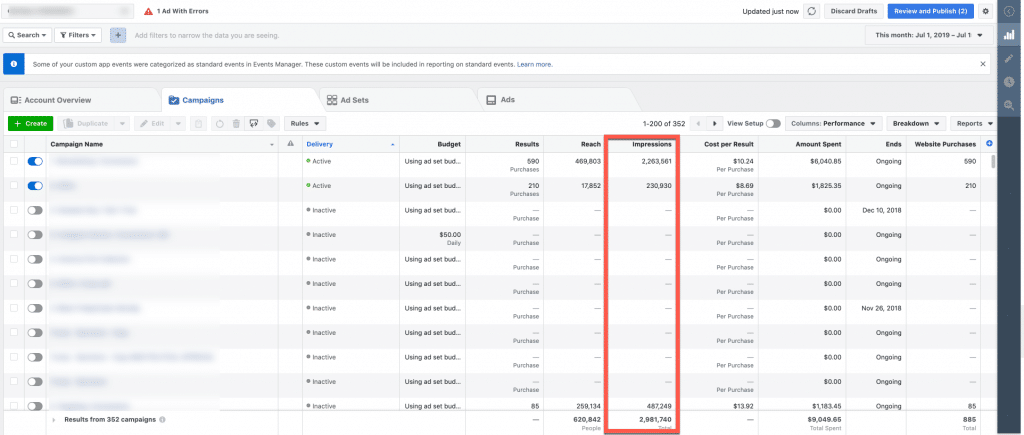
Reason number 1: Impressions are too low when troubleshooting your Facebook campaigns. The first element to look at is how many impressions, your ads are getting in other words impressions are how many times your ad is being shown, the first element to check must be that your ads are being shown enough times in the first place without enough impressions, your ad won't be able to convert because it's a numbers game. A lot of people have to see your ad before you change anything else in your campaign Facebook starts displaying a relevant score when an ad gets at least 500 impressions, therefore anything below 500 is not enough. If you're not getting enough impressions, it's either because your budget is too small or your audience is too small. If you've concluded you're getting enough impressions, move on to checking the second element.
Reason Number 2: The second reason your campaign is not generating results could be because your ad is not getting enough clicks when you don't have enough clicks, it makes it tricky for your ad to convert because it's a numbers game, you need enough clicks to get conversions. Plus, if you're paying for your ads per click instead of per impressions, if you're not getting enough clicks Facebook stops showing your ads because they're not generating revenue from them. So, checking you're getting enough clicks is key. If you're not getting enough clicks it's because your ad is not compelling enough, you either have to change your image or your copy. Remember when creating as you sell the click, not the product or service, your ad needs to entice people to click, not convert into a lead or sale.
Reason number 3: lack of conversions. If you've concluded you're getting enough impressions and enough clicks. The problem is most probably a lack of conversions. In other words, you're not making sales are not generating leads. The reason behind a lack of conversion could be because your

1: landing page doesn't match your ad. In other words, people have a different experience when they reach your landing page because what is on the landing page looks too different from the ad, making them and leave the landing page. If this is the case, adjust the landing page, so it looks similar to the ad, they're clicking.
2: Offer is not compelling- In other words, what you're giving people is not valuable enough to them. If that's the case, change your offer, and make it more irresistible.
3: No clear call to action on your page, or there are too many things to click on a landing page should have just one clickable tab and one simple straightforward. Call to action, don't include other tabs such as social media tabs or bow tabs, etc. Another reason could be the copy on the landing page is not enticing enough. If that's the case, rewrite the sales copy to make it more compelling for people to click on the call to action. Now the reason why your ads may not be converting is that your targeting could be too specific or too broad. This is why when you're choosing your targeting to make sure the gauge is in the middle, not too much to the left and not too much to the right if your audience is too specific target more people until the gauge is in the middle. If your audience is too broad remove some of the people you're targeting until the gauges in the middle. For example, if you're advertising tennis training tutorials for beginners, and your target under interest tennis is way too broad because people who have tennis as interests might just be people who watch tennis games.
Another reason why your Facebook campaigns may not be converting is that your audience is cold. In other words, they don't know like or trust you yet if the people you are targeting most likely don't know you, it can be very tricky to convert them into a lead, let alone a sale. If this is the case your offer should be a low commitment offer such as a free offer, that is a very high value, instead of trying to make them commit to buying something because of the cold audience, usually never buys, or if you want your ad to convert into sales target people who already know like and trust you, such as your existing email subscribers, or your existing Facebook fans.
Lastly, the other reason why your Facebook campaigns are not converting could be because your targeting is too diverse, when your targeting is too diverse it's going to be hard for your ad copy to speak to all the different pain points that people you're targeting have, for example, if you are advertising, a forex trading course, and you decide to target business owners traders and readers of the Financial Times newspaper, trying to create an ad to appeal to all these different people is impossible. Instead, create an ad for each different vertical market, one ad that speaks to the pain point of business owners, another ad that speaks to the pain point of traders, etc. So I hope you've enjoyed this article.
Comments
Post a Comment